
Get started
Gate AI is a security and audit layer for the AI apps and models you already use. Your apps talk to the same model APIs, but you point them at Gate instead of at the provider. Every request is screened for prompt injection, written to a tamper-evident log, and tracked for cost, then forwarded to the provider. The reply comes back unchanged.
Setting up takes two choices: decide how you want to use Gate, then how you want to connect.
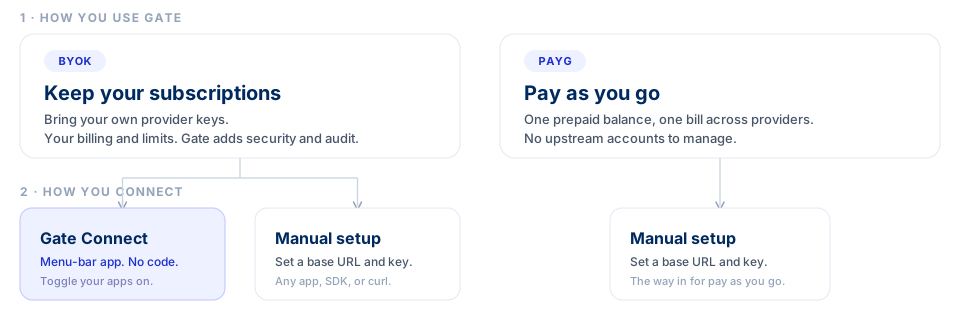
1. How you use Gate
Keep your subscriptions (BYOK). You bring your own provider keys and pass them through Gate with each request. You stay on your current provider billing and rate limits, and Gate sits in front as your security and audit layer.
Pay as you go. Gate holds the provider credentials and charges a prepaid balance you top up. You get one bill across every provider, with nothing to manage upstream. This is the quickest way to start from scratch.
See Authentication for the exact request headers, and Plans for how billing works.
2. How you connect
Gate Connect is a menu-bar app that routes the apps you already run through Gate, with no code. It is available today when you bring your own keys.
Manual setup points an app, SDK, or your own code at Gate by setting a base URL and a key. It works whichever way you use Gate.
That leaves two short paths:
- Bring your own keys: use Gate Connect, or set it up manually.
- Pay as you go: use manual setup.
What Gate Connect does
Gate Connect runs in your menu bar and flips the apps you already run so their traffic routes through Gate. You turn on the apps you want covered, and their requests start flowing through Gate with your own provider keys. Nothing else in your workflow changes.
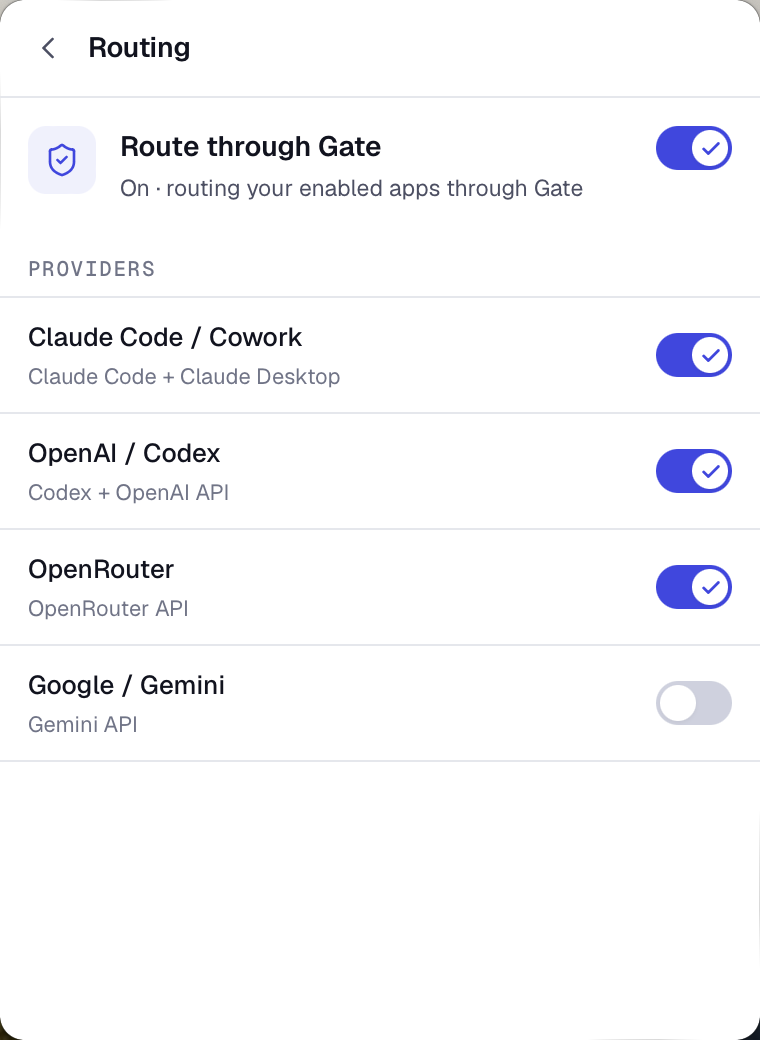
Install it from the Gate Connect quickstart.
What you get, either way
The path you choose changes only how requests reach Gate. Once they do, every request runs through the same pipeline:
- Prompt-injection screening that catches known attack patterns before they reach the model.
- A tamper-evident audit trail of every call, so you can show exactly what your apps and agents did, and when.
- Cost and usage tracking across providers, with response caching that cuts the cost of repeated calls.
- One Gate address in front of the model providers you already use.
Start your setup
For the exact request headers and how each call decides who pays, see Authentication.
Your plan, Free or Pro, is a separate choice. It sets which platform features your organization gets, such as team roles and audit export, and does not change how you use Gate or how you connect. See Plans.
Getting help
Email support@constellationgate.ai with any question about your account, your setup, or something Gate is doing that you did not expect. That address reaches the Gate team and is the same one behind the Support item in the dashboard user menu.
Enterprise pricing, procurement, and deployment questions go to info@constellationnetwork.io instead. See Plans.